

This article discusses a scam that abuses CoFoundersLab and Telegram to reach job seekers. Neither CoFoundersLab, Telegram, nor their services are involved in the scam. All third-party company names, product names, brand names, and trademarks referenced in this article are the property of their respective owners.
You applied for a promising role, and a recruiter messaged you on Telegram to set up an interview. Now you’re in a video interview portal that looks completely professional. Then a message pops up: your camera and mic are blocked, and the portal offers “fix” it if you paste a quick command. Watch out! That command installs malware, and the whole interview is fake. Here’s how this scam works and how to stay safe.
How the scam works
1. A fake job posting on a legitimate job site
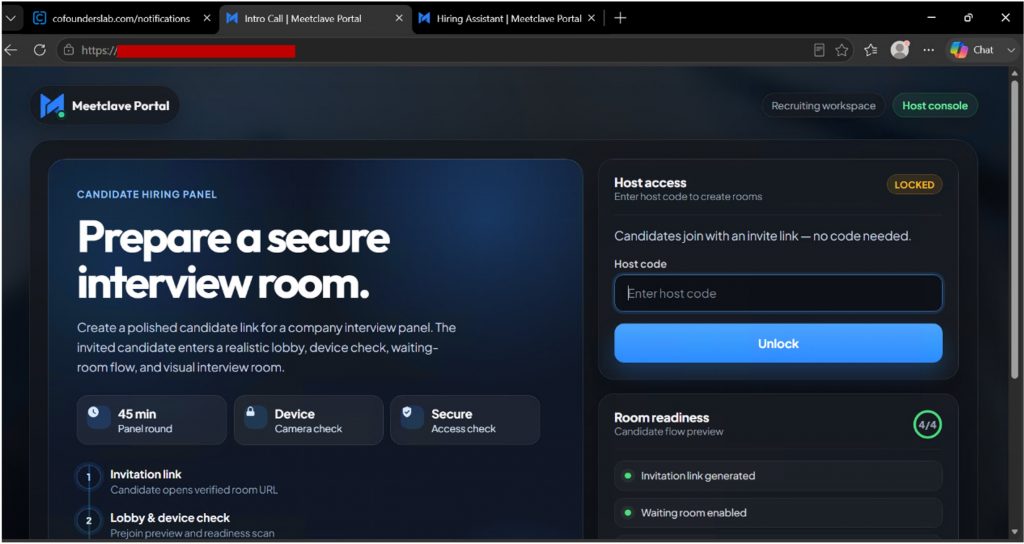
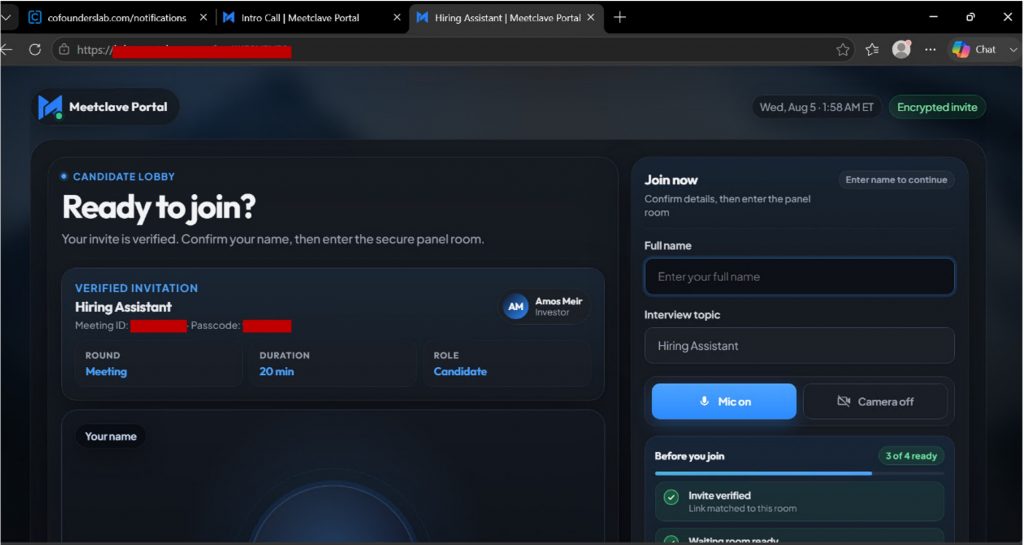
Scammers post openings on real job sites like CoFoundersLab meant for start-up companies, often for roles such as a hiring assistant or investor-facing position. When you respond to the fake job posting, someone who is posing as a recruiter reaches out to you on Telegram to schedule an interview and sends you a personal invitation link to a portal at join[.]meetclave[.]com. The page looks convincing: you see a candidate lobby, a meeting ID and passcode, an “encrypted invite” badge, and a named interviewer and investor. Everything is built to feel like a secure, legitimate hiring platform.
2. A camera error ruse
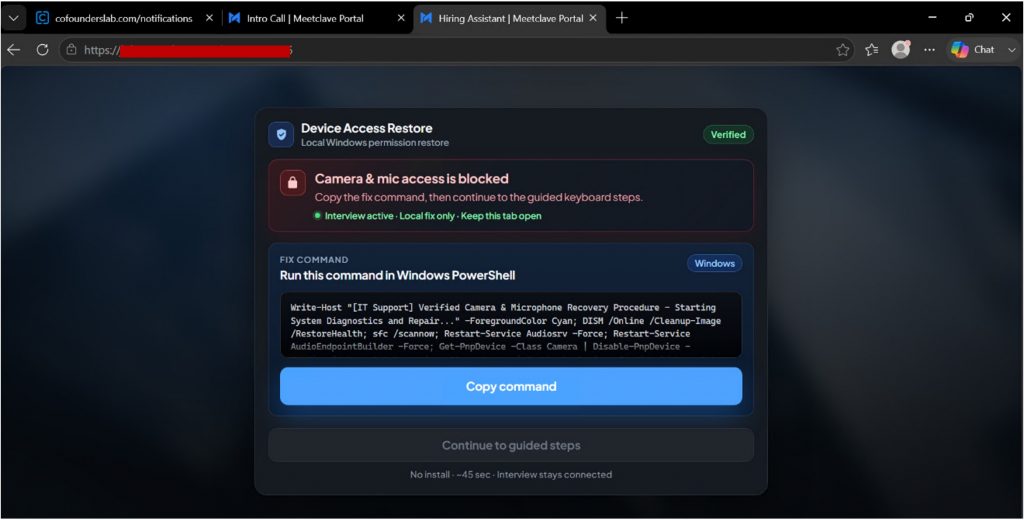
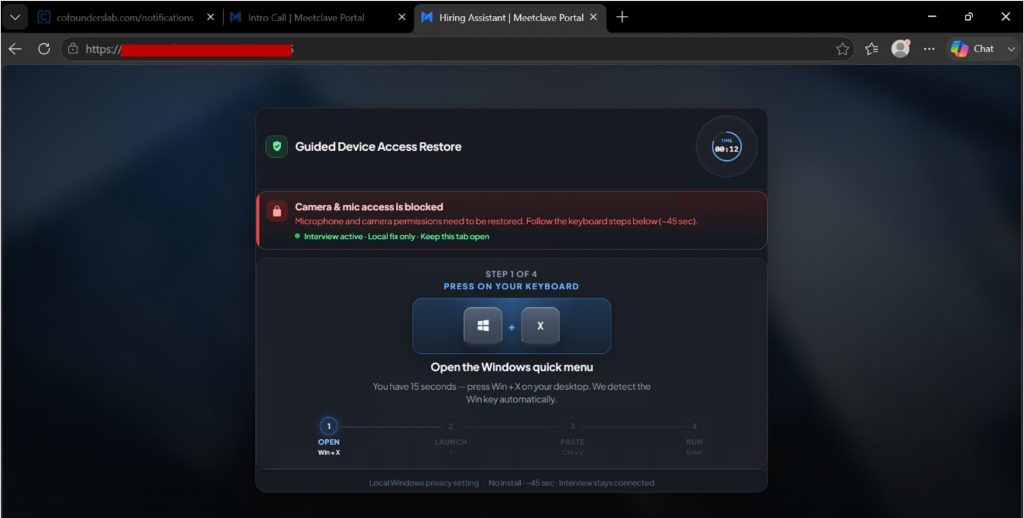
Once in the portal, a message appears stating that the camera and mic access is blocked” followed by instructions to restore access. The first step tells you to press Win+X to open the Windows quick menu. The next step is to copy and paste a “fix command”, framed as restoring a Windows privacy setting. This technique is called Click Fix: the scammer gets you to run the command yourself, so they never have to break into your system and do it.
3. Malware takes your data
This simple copy and paste act initiate a process that silently downloads and runs a malicious file from the scammers’ server. It uses hidden window and policy-bypass flags, so nothing appears wrong on screen. It installs an info-stealer or a remote access trojan. From there, saved passwords, browser session tokens, crypto wallets, and personal files are copied off your device. The interview never happens. The portal goes dark, the recruiter stops replying or blocks you, and the stolen data gets sold or used to break into your accounts.
Red flags to watch for
This is a sophisticated scam but can be avoided. Here’s what to watch for:
- A recruiter who moves you to Telegram: Real hiring teams schedule interview using their own scheduling tools and company email addresses, not a platform such as Telegram.
- An interview link on an unfamiliar domain: A portal like join[.]meetclave[.]com isn’t a known video platform, no matter how polished it looks.
- A “camera blocked” error message that can only be fixed by the site: Camera permissions are handled by your browser and operating system, not by copying and pasting a command from a website.
- Any request to press Win+X or open PowerShell: No legitimate interviewer asks you to run system commands to join a call.
- A copy-and-paste “fix command”: Following this instruction may hand over control of your device to the person or website that requested it. This is the core of the trap.
- Pressure to act fast to “save the interview”: Creating a sense of urgency is designed to stop you from pausing and verifying if the action, you’re about to take is safe or not.
How to stay safe
- Verify the company and recruiter first. Look up the company directly and confirm the role, the recruiter, and the interview channel before joining any online meeting. Send links to Trend Micro ScamCheck to check if it’s a scam.
- Never paste a command to fix a call. If a camera or mic isn’t working, close the page. Real problems are solved in your browser or Windows settings, never by instructions from a website.
- Join interviews only on known platforms. Stick to tools you can verify and be wary of one-off portals sent by somebody you don’t know well.
- Keep security software on and up to date. Products such as Trend Micro Maximum Security can help block malicious downloads and websites.
- Act fast if you’ve already run the command. Disconnect from the internet, change your important passwords using a different device, turn on multi-factor authentication, and run a full security scan.
For more safety tips on how to avoid job recruitment scams, please visit this blog.
The bottom line
This scam works by mimicking a real hiring process; even careful, tech-savvy people may run into it while job hunting. The one tell-tale sign is the request to run a command yourself. No genuine interview platform or process will ever ask you to copy and paste a set of instructions to continue with the interview. Trust your instincts if something seems amiss and always take your time to verify everything so you can go forward with landing that dream job.
0 Comments
Other Topics
You Might Also Be Interested In...
![[Alert] AI-Based Threats and Scams to Watch Out For](/blog/_next/image?url=https%3A%2F%2Fnews.trendmicro.com%2Fapi%2Fwp-content%2Fuploads%2F2023%2F05%2FiStock-1476755720-768x432.jpg&w=3840&q=30)


