
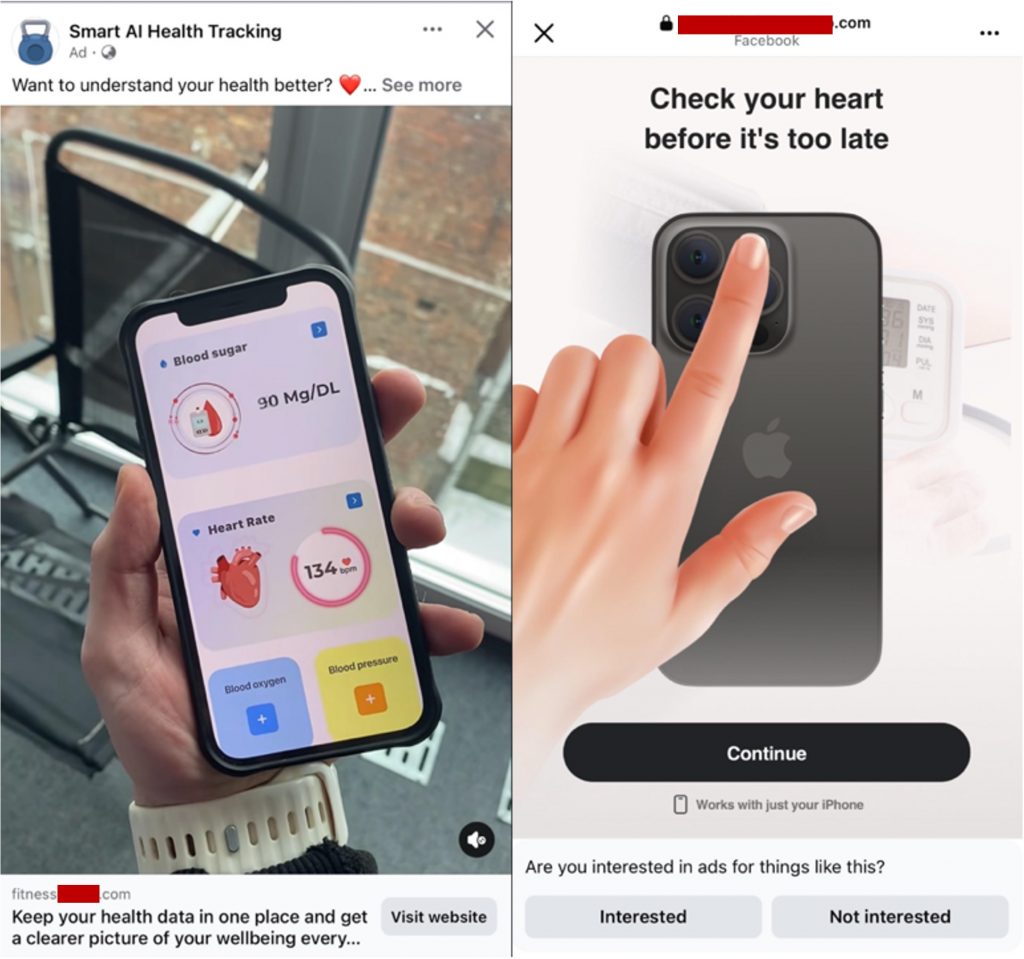
You’ve probably scrolled past it: an ad on Facebook or Instagram showing a hand pressing a finger to an iPhone’s rear camera, with a dashboard reading out blood sugar, heart rate, blood oxygen, and blood pressure. The pitch is simple and appealing. Turn your phone into a personal health monitor, free to try. TrendLife’s threat research team followed one of these ads end to end, using test data only, and found a funnel built to collect verified payment cards and personal information rather than to deliver any working app.
What the ad promises
The ads run under names like “Smart AI Health Tracking,” “Heart Beat Monitor,” or “Blood Measure Monitor,” each showing inflated engagement counts and a mocked-up dashboard. Look closely and the numbers don’t add up: one sample showed a normal blood sugar reading next to a heart rate of 134 bpm, the kind of mismatch you’d expect from a static design mockup, not a live scan. No phone camera can measure blood sugar, blood pressure, or blood oxygen, regardless of what the mockup shows. At best, a camera can approximate a pulse under good lighting.
How the funnel actually works
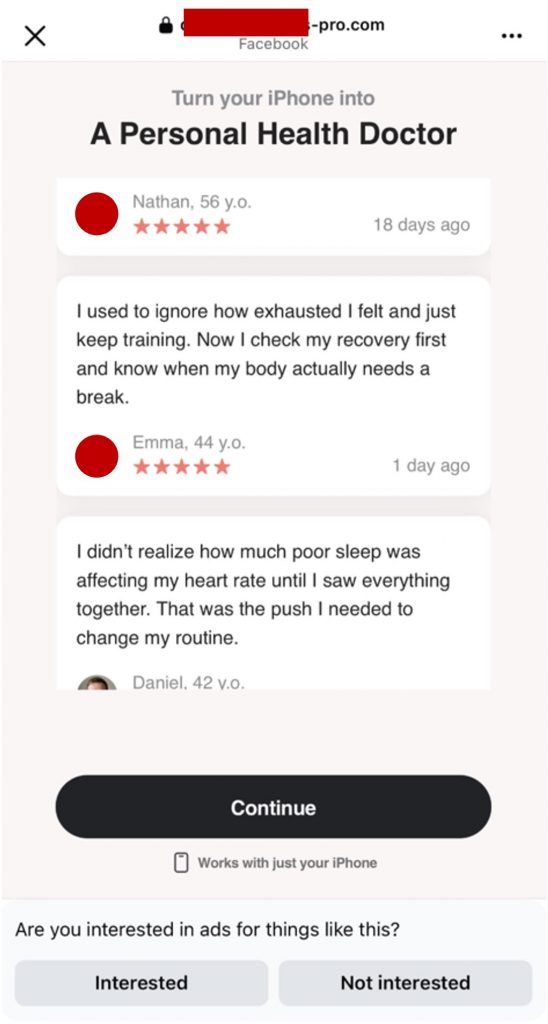
Tapping the ad’s link opens an in-app browser on a different domain than the one shown in the ad preview, a mismatch known as domain cloaking that helps these campaigns slip past ad review. From there, three screens build urgency and false authority in quick succession: “Check your heart before it’s too late,” fabricated five-star testimonials, and a glowing anatomical-heart graphic borrowed to suggest clinical credibility.
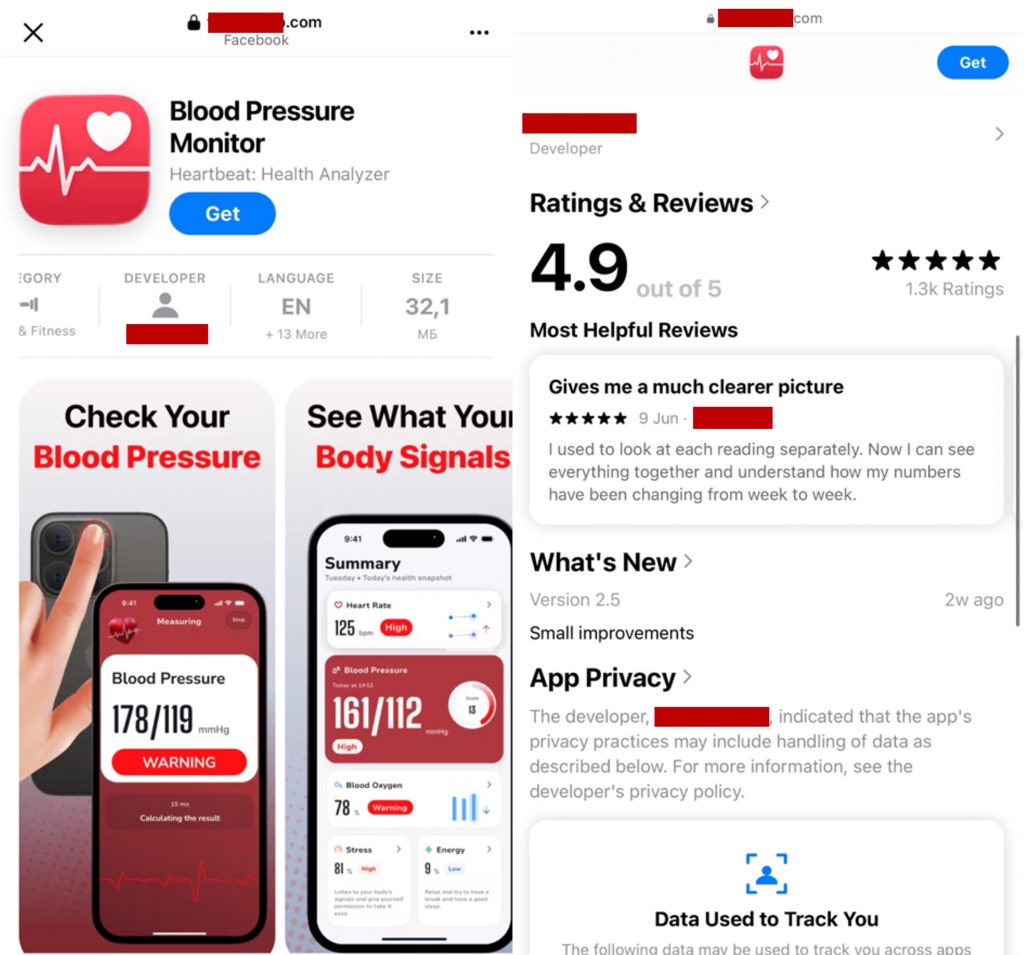
Another variant swaps in an App Store-style mock-up page showing a 4.9-star rating, adding one more layer of borrowed legitimacy before the payment form appears.
Tapping “continue” opens a payment form asking for a full card number, expiry, and CVC to authorize a “$0” charge. Scroll further and it also asks for your name, email, city, phone number, and home address. When test card details were entered, the phone’s own Meta Pay autofill surfaced its native “save card” prompt, complete with Meta’s branding. That’s a platform-level trust signal doing work the scam funnel didn’t have to fake. After the “$0” charge, the form loops back to itself with no receipt and no error. No app is ever delivered.
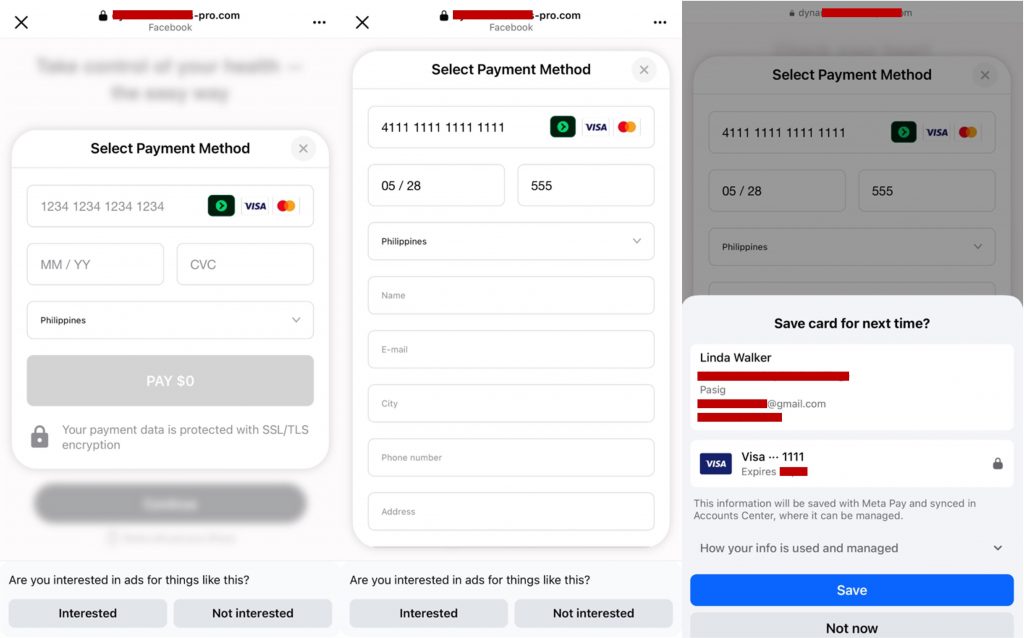
Across every version of this funnel TrendLife analyzed, the same pattern repeated: a free app promise, unauthorized charges, recurring billing that continues past the initial hook, no working way to cancel, and no support contact to appeal to.
The red flags
A few details give it away every time. Here are some red flags to watch out for:
- A “free” app with no real App Store link: legitimate apps let you verify them directly in the App Store or Google Play before you ever hand over payment details. A ratings screen mocked up inside the funnel itself, like a fake 4.9-star app-page graphic, doesn’t count as verification.
- A “$0 to verify” charge: requesting full card details to authorize a zero-dollar charge is a known way to get a live, working card without triggering a bank’s fraud alerts.
- Extra fields beyond payment: a genuine verification hold needs card details only. Name, email, phone number, and address on top of that build a resellable identity-and-card bundle.
- A payment form that loops: tapping “pay” sends you back to the same blank form, with no confirmation and no decline message. The form exists only to log what you type.
- Trust signals that don’t mean what they imply: a “Save card with Meta Pay” prompt only means Meta’s own systems are storing the card. The merchant behind the charge hasn’t been checked at all. An “SSL/TLS encrypted” badge only tells you the connection is encrypted. It says nothing about who’s receiving your data. A mocked-up App Store rating page inside the funnel works the same way: it’s designed to look like proof the app is real, and it doesn’t link anywhere.
How to stay safe
- Verify before you tap. Search for the app by name directly in the App Store or Google Play instead of following an ad’s link, and check the actual publisher and recent reviews before doing anything else. A star rating shown inside the ad’s own landing page isn’t real verification, wherever it points.
- Compare the domain to the brand. If the ad’s link preview shows one website and the page you land on is a different domain, close the tab. That mismatch alone is a dealbreaker.
- Back out cleanly if you’re already on the page. Close the tab or in-app browser and clear its cache rather than just navigating away, since cached session data can reload the same redirect. If the page displays a phone number, don’t call it. Calling only tells the scammer your number is worth pursuing, and closing the tab is enough.
- Treat every “$0” request the same way. A legitimate free trial states the merchant name, the exact post-trial price, and how to cancel, all up front. If a form skips straight to full card details for a “$0 verification,” step away.
- Act immediately if you’ve already entered your details. Contact your card issuer to flag the card and request reissue rather than waiting for a fraudulent charge to appear. Watch your statements for several weeks, including small or unfamiliar recurring charges, and stay alert for follow-on phishing referencing the name, email, or address you entered.
- Report the ad on the platform. Flagging it on Facebook or Instagram helps their enforcement systems catch and remove the campaign.
- File a report with a consumer-protection agency if you’ve lost money or data. In the US, that’s the FTC at ReportFraud.ftc.gov. In the UK, it’s Action Fraud.
This kind of scam rarely stops at just one person in a household. TrendLife Kaleida‘s Security Layer blocks scam calls, texts, and risky websites before they reach your family, and its Family Circle feature keeps everyone in the loop when one member is protected. Pair that with dark web monitoring that alerts you if your family’s data turns up in a breach, and you have a second set of eyes watching for scams like this one. Visit this page to see how it works.
This funnel is built to feel legitimate, and even people who know to be careful online can read past its signals on a quick scroll. The tell is the mismatch between what’s promised, a free health-tracking app, and what’s actually delivered: nothing, ever. Trust that gap when you spot it, and you’re already ahead of this one.
0 Comments
You Might Also Be Interested In...


