

This article discusses a scam that impersonates Geek Squad and other online services. Neither Geek Squad, Best Buy, Google, nor their services are involved in the scam, and this article should not be interpreted to state or imply any wrongdoing on their part.
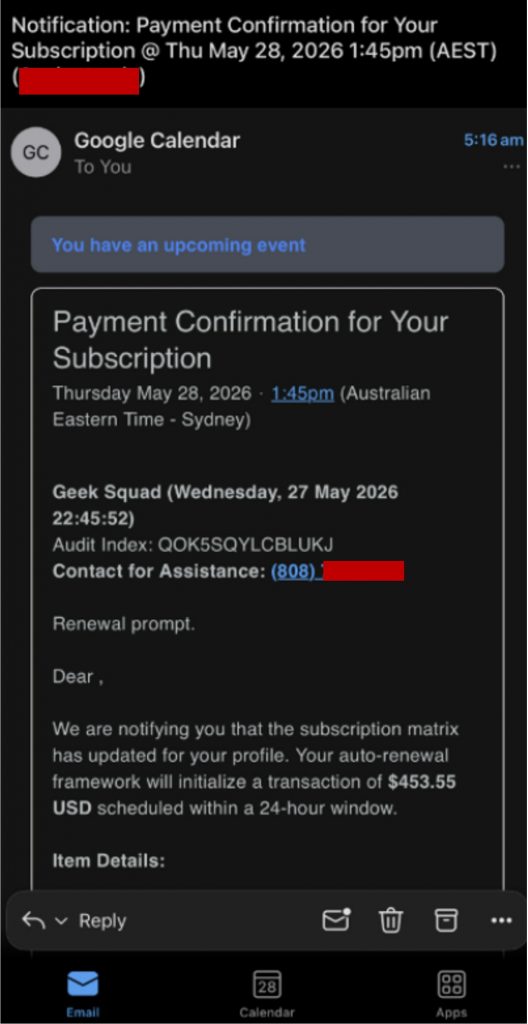
You open Google Calendar and see a new event: a billing notification from Geek Squad or other services. It says a subscription renewal of $443 or more is processing in the next 24 hours. It looks exactly like everything else on your calendar. It was put there by a scammer. No subscription exists, and no charge is coming. The only goal is getting you on the phone. Here’s how to spot it and what to do.
How the scam works
1. A fake billing alert lands in your Google Calendar
Anyone can send a Google Calendar invitation, including scammers. Under default settings, those invitations are added automatically without the recipient having to accept. That’s what makes this work: the event just appears between real meetings and reminders, styled like a legitimate appointment.
The event itself contains a fabricated subscription renewal, typically $443 to $555, impersonating Geek Squad or other online services. A reference number, a named account manager, and a 24-hour deadline are included to simulate an official billing record. There’s no suspicious link to hover over. No attachment to open. Just a phone number to call.
2. The phone call connects to a fake support agent
A live criminal operator answers the call posing as a customer support agent. They proceed to verify your identity, confirm account details, and process your cancellation to the fabricated subscription. At some point in the call, they’ll ask you to install remote access software, supposedly to confirm the refund, or remove the subscription from your device. It seems as though they are being helpful, but that’s the moment real access to your device is transferred to a criminal.
3. The “refund” gives the scammer remote access to your device
Once you install the software, the criminal operator can see and control your screen in real time. You’re guided to log into your bank account, supposedly to verify the cancellation. At that point, the operator can capture your login credentials and move funds directly out of your account during the session. The amount stolen often exceeds the fabricated charge on the calendar event. No subscription ever existed, and no refund was ever being processed.
Red flags to watch for
Here’s what to watch for if one of these shows up in your calendar:
- A billing alert in your Google Calendar from an online service: No legitimate company sends billing notices via Google Calendar. No online service you subscribe to will do this. If one appears in your calendar, it’s a scam.
- A 24-hour deadline: Legitimate subscription renewals arrive by email well in advance. A same-day countdown is designed to create a sense of urgency and stop you from verifying before you call.
- Reference numbers, a dollar amount, and a named account manager: Fake records are built to look like real ones. The more structured the details, the more likely you are to trust them without checking.
- A phone number as the only way to cancel: Real services let you manage subscriptions through your account dashboard, not through a call to a number embedded in a calendar event.
- A request to install software during the call: Any support call that asks you to install remote access software is asking for direct access to your device and accounts. End the call.
- Wrong name or account details in the event: These invitations are sent in bulk to purchased email lists the criminal has obtained. The sender has no real record of you. Wrong names and unrecognized account details are common because the fabricated charge was never connected to your actual account.
How to stay safe
- Delete the event. Don’t call the number, don’t click anything in the event description. Just delete it.
- Check your subscriptions directly. If you’re concerned about a real charge, open a browser and go to the service’s official website, never through anything in the calendar event.
- Update your Google Calendar settings. In Settings → Event settings, change “Automatically add invitations” from “Yes” to “No, only show invitations to which I have responded.” This stops unsolicited events from being added to your calendar without your action. Seeing this on your iPhone instead? Here’s how to remove iPhone Calendar spam.
- Use Trend Micro ScamCheck to analyze suspicious phone numbers and screenshots before you engage.
- Report the scam to your local authority. Reporting helps flag the patterns that protect others, even if you didn’t lose money.
- U.S.: File a report at ReportFraud.ftc.gov.
- Australia: Report to Scamwatch at scamwatch.gov.au.
- Taiwan: Call the 165 anti-fraud hotline or report online at 165.npa.gov.tw.
You’ve got this
Calendar notifications carry a kind of trust that email doesn’t anymore. A suspicious invoice email may get a second look. A notification sitting between your real appointments doesn’t, and that’s exactly what makes this scam work. Now that you’ve seen the pattern, you’ll recognize it if it shows up. Delete it and move on.
0 Comments
Other Topics
You Might Also Be Interested In...


![Costco, Shell, SSA, Louis Vuitton, blogdodge[.]shop, and Gmail — Top Scams & Phishing Schemes of the Week](/blog/_next/image?url=https%3A%2F%2Fnews.trendmicro.com%2Fapi%2Fwp-content%2Fuploads%2F2022%2F08%2FiStock-1402696081-768x512.jpg&w=3840&q=30)

