
Sites exploiting Apple’s 2026 product launch: fake preorders and the credential-theft risk from just opening a page
This article discusses sites that impersonate Apple. Apple and its services are not involved in these sites. All brand names are trademarks of their respective owners.
Excited about the new iPhone and wondering when you can preorder it or find details on the new models? Scammers know you’re searching for that too. Around Apple’s 2026 product announcements, TrendLife researchers found a range of sites, including fake preorder pages and sites designed to drive advertising revenue.
The sites TrendLife found do not all have the same goals or pose the same risks. Some direct visitors to affiliate ads, while others are suspected of using fake preorders to obtain payments or payment information. Still others pose as preorder pages or discounted-sale offers but may launch an attack aimed at sensitive information stored on a vulnerable iPhone simply when the page is opened. Here’s how these risks differ and what you can do to protect yourself.
“Can I preorder early?” Watch out for fake preorder pages
Before official preorders begin, a page offering to let you reserve a new iPhone can look like a chance to get ahead. But that sense of urgency is exactly what makes a fake offer persuasive. An independent domain-research investigation, covered by Forbes, found sites imitating iPhone sales pages appearing before Apple’s September 2026 event.
Once Apple announces a product’s price and specifications, fake sites can use those details to make their sales pages look more convincing. If you see a preorder offer, don’t rely on the page’s claims alone. Check the preorder date and sales terms independently through Apple or a retailer you trust.
“Is this promotion real?” An affiliate link is not an official Apple offer
A site named after a new iPhone model might just redirect you to an ad, not a fake checkout. TrendLife researchers found an iPhone-themed site directing visitors to an affiliate advertising site. With affiliate advertising, a referrer may earn a commission when someone follows an ad and completes an offer.
Affiliate advertising is not inherently fraudulent. But an Apple-related name does not prove that a site is affiliated with Apple, can accept official preorders, or offers a special price. If a page takes you to another ad or sign-up form, independently check the seller, the destination, and the offer’s terms before entering personal or payment information. If a promotion claims Apple’s endorsement, verify the claim through Apple’s official channels rather than trusting the promotion itself.
“I’m only browsing.” A vulnerable iPhone could still be at risk
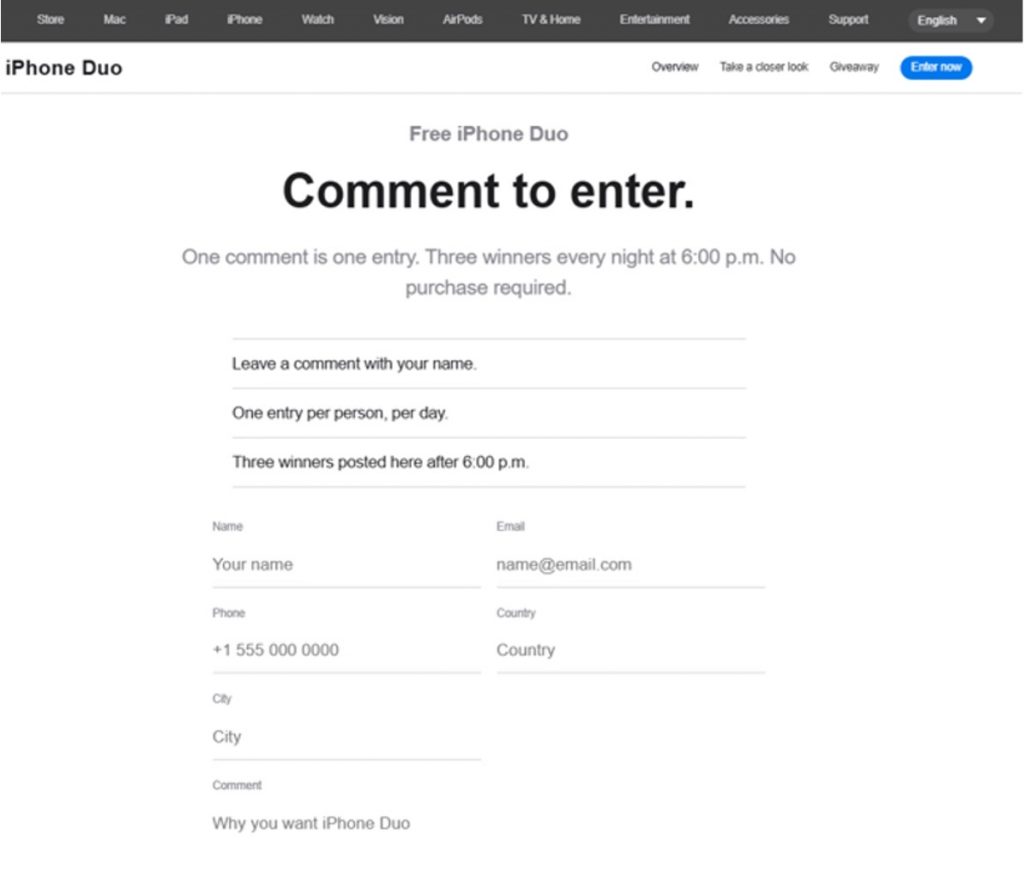
Malicious sites don’t always ask you to pay, sign in, or install anything. TrendLife researchers investigated a site posing as an iPhone Duo giveaway or discounted sale that loaded different attack code based on the visitor’s iOS version and attempted to exploit known iOS vulnerabilities. If an attack succeeds, credentials stored on the device could be stolen and accounts could be taken over. On a vulnerable iPhone, simply opening the page can put credentials at risk, even without tapping “Buy” or entering a password.
Red flags to watch for
These signs can help you decide when to take a closer look. They’re not a complete checklist. Stay cautious about unfamiliar sites even when none of these signs are present.
- An “early” preorder or steep launch discount you cannot verify: Check the claim with Apple or a trusted retailer before trusting the page.
- A countdown timer or special offer pressuring quick action: Take the time to check the details regardless of the deadline shown.
- Broken policy links or product information that doesn’t match Apple’s announcement: A mismatch with Apple’s official details is a sign the page isn’t what it claims.
- An unsolicited message or ad urging you to open a preorder or sales page: Go to a trusted source directly instead of following the link.
How to stay safe
- Go directly to a trusted source. Check preorder dates and availability with Apple or a retailer you already know, rather than starting from an unexpected message or ad.
- Send the link or a screenshot to Trend Micro ScamCheck before you act on it. You’ll get an immediate read on whether it’s safe, before you click anything or enter any information.
- Keep your operating system and software updated. On an iPhone, go to Settings → General → Software Update and install the latest available update. Updates help protect against known vulnerabilities that malicious sites may target.
- Strengthen your accounts. Turn on multi-factor authentication. Where available, consider using passkeys to sign in.
- Act quickly if payment details or credentials may have been exposed. If you entered payment information on a suspicious page, contact your card issuer promptly. If you suspect your account credentials were compromised, change your password and contact the service provider.
- Consider security software. Even when you take care to avoid suspicious sites, scammers can catch you off guard. A security product may help block access to malicious pages.
- Report the site. In the US, report to the FTC at ReportFraud.ftc.gov.
New Apple product launches create real excitement, and scammers set up sites to cash in on exactly that. These sites are built to look current and legitimate, timed to launch right when real preorder pages do, so even careful, tech-savvy people encounter them. If an offer or deadline feels like it’s rushing you, take a step back and verify it independently or check with someone you trust before you act.
0 Comments
You Might Also Be Interested In...


