This article discusses scams that impersonate Telegram, WhatsApp, and Facebook. Neither Telegram, WhatsApp, Meta, nor their services are involved in these scams. All brand names are trademarks of their respective owners.
Fake verification messages impersonating Telegram, WhatsApp, and Facebook are locking people out of their own accounts. The message looks official, uses the right branding, and gives you a tight deadline. But the “verification” link hands your account to someone else. Here’s how these takeover scams work across all three platforms.
How the scam works
1. A text or email warns that the account will be suspended unless the owner verifies immediately
The message arrives by SMS or email and claims the recipient’s social media account has violated content, copyright, or security policies. It says the account will be restricted, banned, or permanently deleted unless verification is completed within 6 to 24 hours. Here are real examples:
- Telegram (SMS): “Your account may violate content rules. Verify your account within 12 hours to prevent permanent restriction”
- WhatsApp (SMS): “Please verify your WhatsApp account within 12 hours. Failure to do so will result in forced account suspension”
- Facebook (email): An email from “Meta Team” warns that the page is under review for a policy violation and links to an appeal form
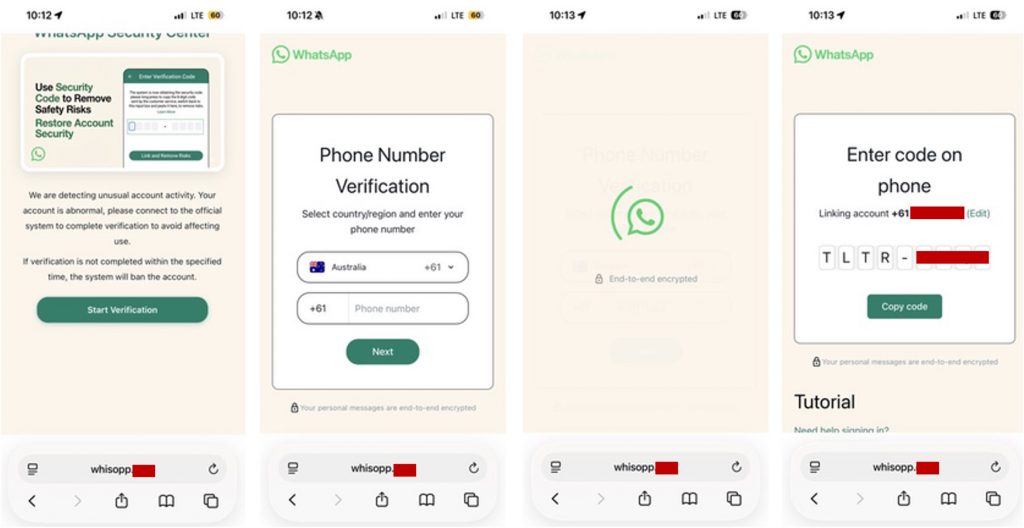
Each message includes a link to a typosquatted domain like “vvhatapp[.]co,” “whisopp[.]com,” or “wahatsapp[.]me.” Some variants are routed through legitimate services like Google AppSheet or Meta’s own Business Manager, so they can land in the inbox looking like real platform mail.
Not all variants use fear. Some offer something appealing instead: approval for a “Blue Verification Badge” on Facebook. The message congratulates the recipient on being selected and asks them to confirm their eligibility. The bait is the blue checkmark, but the real goal is the same: login credentials.
2. The verification page mirrors the real platform and asks for login credentials and a security code
Tapping the link opens a page that replicates the login flow of the targeted platform. Each variant looks different, but they all collect the same thing: credentials and a security code.
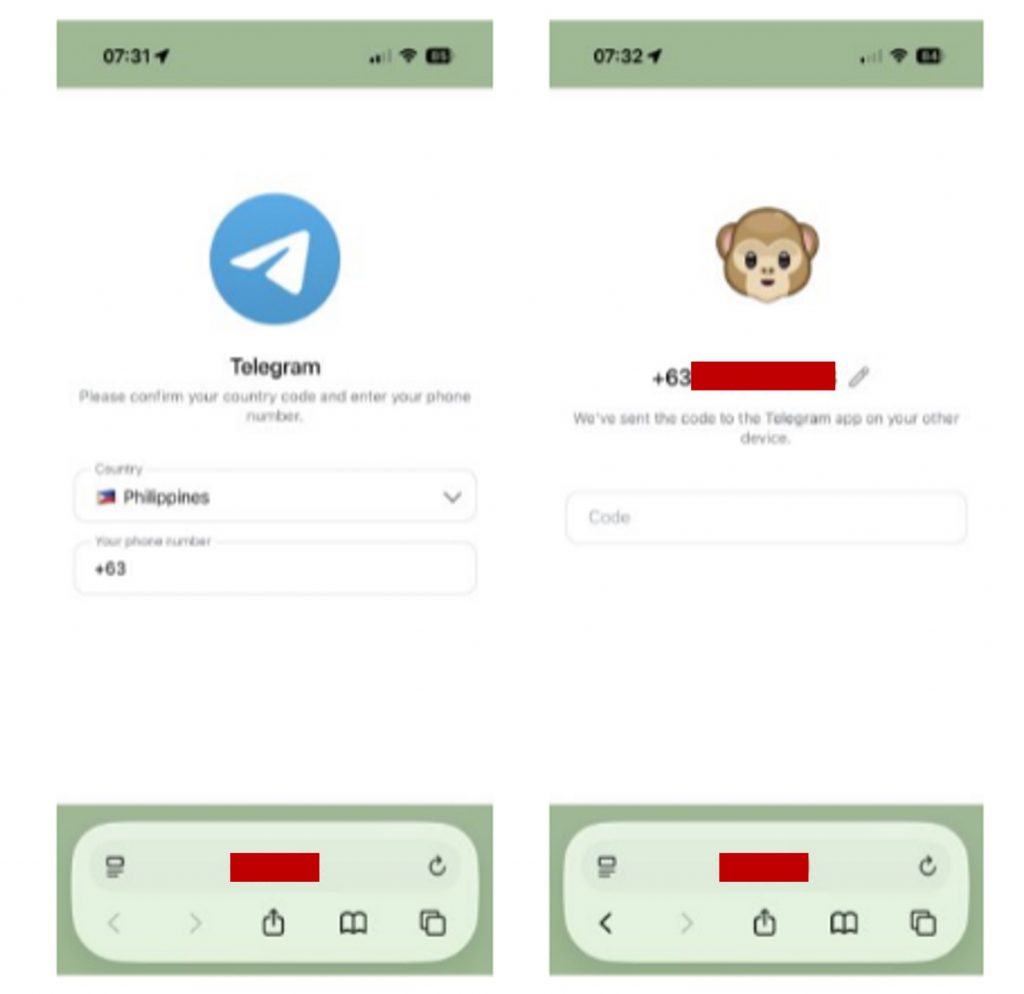
Telegram: The fake site shows a phone-number entry screen that looks identical to Telegram’s real login. After entering the number, the person is asked for the verification code Telegram sends to their device.
WhatsApp: Some variants reproduce a full support page with FAQs, account panels, and a live chat window. A fake “support agent” from the “WhatsApp Official Certification Center” walks the person step by step through surrendering their security code. In other cases, there is no fake website at all. The agent asks the person to open WhatsApp’s Linked Devices setting and enter a code that connects the scammer’s device to their account.
Facebook/Meta: A multi-step form walks the person through what looks like an official appeal or review. It starts with basic details like name and email, then asks for the account password and two-factor authentication code. The Blue Badge variant mentioned in Step 1 follows the same pattern, framing each step as part of the approval process.
3. With the credentials and security code, the scammer takes full control of the account
Once they have the password and two-factor code, the scammer logs in, changes the email and password, and locks the original owner out. Any connected business page or advertising account is taken over too.
From the compromised account, the scammer sends the same verification scam to the owner’s contacts, spreading the attack under a trusted name. Private messages, media, contact lists, and any linked payment methods are all exposed.
Red flags
You’ve got this. Here’s what to watch for:
- An unsolicited message about a policy violation: Real platforms handle policy enforcement inside their apps, not through SMS or email links.
- A 6-to-24-hour deadline: Legitimate processes don’t threaten permanent deletion on a tight clock.
- A misspelled domain name: Check for “whisopp.com,” “vvhatapp.co,” or similar lookalikes before tapping.
- A request for your two-factor code: No real platform asks for your verification code on an external site or through a chat agent.
- A “support agent” asking you to link a device: WhatsApp, Telegram, and Facebook never ask you to generate or share a linking code in a chat.
- A Blue Badge offer arriving by text or email: Verification programs use in-app applications. They don’t reach out first.
How to stay safe
- Don’t tap links in account-warning messages. Open the app directly and check for notifications or policy alerts inside your account settings.
- Never share your two-factor or verification code. No platform employee will ask for it by text, email, or chat.
- Check the sender and URL carefully. Look for misspellings in the domain and verify the sender email matches the platform’s official domain.
- Use an authenticator app for two-factor authentication. App-based codes are harder for scammers to intercept than SMS-based codes.
- Report the message. File a report with the relevant authority in your country, such as the FTC (US), Scamwatch (Australia), or the 165 anti-fraud hotline (Taiwan). Reporting helps authorities track these campaigns and warn others.
- Use Trend Micro ScamCheck. It can identify suspicious links and messages before you tap them.
Now you know
These scams succeed because losing access to a social media account feels urgent, especially when it’s tied to a business or your daily communication. Even careful people can act quickly when a message threatens to delete their account in hours. Now that you know what these fake verification messages look like, you can pause, check inside the app, and keep your account safe.
0 Comments
You Might Also Be Interested In...